3-D Secure 1.0
To make payments more secure, most bank cards are protected by the 3-D Secure authentication mechanism.
Requests for payments with a card protected by 3-D Secure 1.0 are processed differently from the standard flow, as described in detail below.
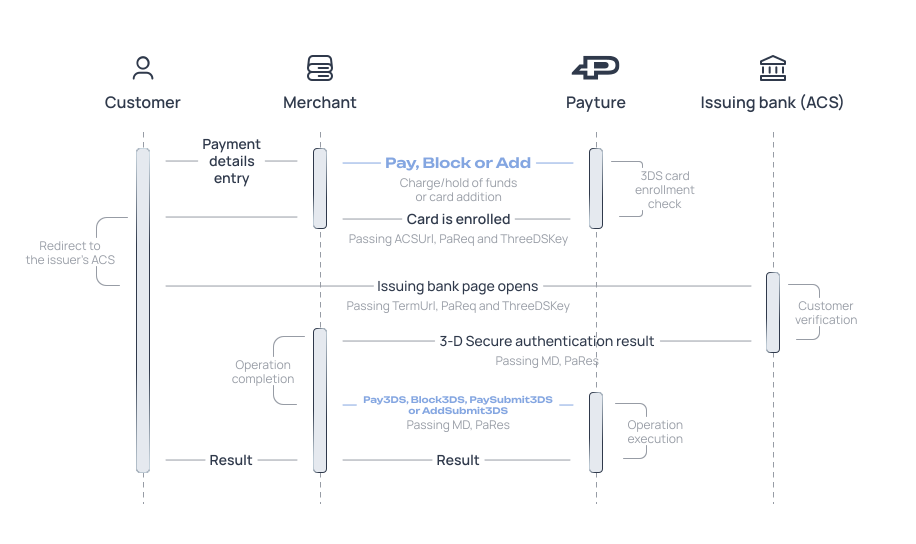
Checking whether the card is enrolled in 3-D Secure authentication
When the payment gateway receives a request to make a payment or add a card, it checks whether 3-D Secure authentication is available.
If the Customer's card is protected by 3-D Secure, the Success parameter in the synchronous response to the Pay, Block or Add command is set to “3DS”. In this case, the payment gateway response includes the ACSUrl, PaReq and ThreeDSKey parameters required for further 3-D Secure authentication.
| Parameter | Description | Format |
|---|---|---|
| ACSUrl | 3-D Secure authentication server (ACS) URL Returned if “Success=3DS” | String |
| PaReq | 3-D Secure authentication request Returned if “Success=3DS” | String |
| ThreeDSKey | Unique transaction ID (MD) Returned if “Success=3DS” | String |
Performing authentication
After receiving the response from the payment gateway, the Merchant redirects the Customer to the issuing bank's page for additional authentication.
To do this, a POST request is sent to the URL specified in the ACSUrl parameter. The request includes the following parameters:
| Parameter | Description | Format |
|---|---|---|
| TermUrl | Merchant URL that receives the results and to which the Customer is redirected after 3-D Secure authentication | String Mandatory |
| MD | Unique transaction ID Matches the ThreeDSKey parameter from the response to the Pay or Block request | String Mandatory |
| PaReq | 3-D Secure authentication request Matches the PaReq parameter from the response to the Pay or Block request | String Mandatory |
Example request form
<body onload="document.form.submit()">
    <form name="form" action="{ACSUrl}" method="post">
        <input type="hidden" name="TermUrl" value="{TermUrl}" />
        <input type="hidden" name="MD" value="{ThreeDSKey}" />
        <input type="hidden" name="PaReq" value="{PaReq}" />
    </form>
</body>
Receiving the authentication result
After the check, the issuing bank returns the Customer with a POST request to the Merchant URL specified in the TermUrl parameter. The request body contains the following parameters:
| Parameter | Description | Format |
|---|---|---|
| MD | Unique transaction ID Matches the value passed earlier | String |
| PaRes | String containing the 3-D Secure authentication results | String |
Completing the payment
Finally, to charge or hold funds on a card protected by 3-D Secure, the Merchant must pass the authentication results received from the issuing bank to the payment gateway. For the Payture API interface, the results are passed in the Pay3DS or Block3DS request. For Payture eWallet, they are passed in PaySubmit3DS or AddSubmit3DS.